
Developer · Worked tutorial
The standard example, explained
A worked tutorial following how six scripts turn operating assumptions into commands, how later rules can override them, and how a cycle advances.
The operating question behind the sequence
A variable feed is only one part of an operating scenario. Equipment may be unavailable, a stockpile may buffer the process, and a controller may compete with a direct command. The six-script example provides a way to reason about these interactions in order. The code remains exactly as supplied so that each interpretation can be related to a statement in the source.
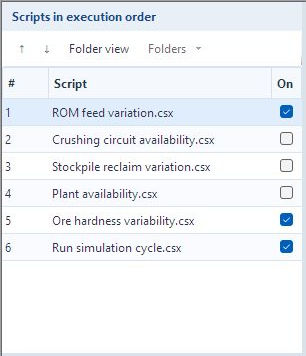
| Order | Script | Captured enabled state | Role |
|---|---|---|---|
| 1 | ROM feed variation.csx | Enabled | Normal ROM solids/water commands |
| 2 | Crushing circuit availability.csx | Disabled | Crushing interlock can stop feed and conveyor |
| 3 | Stockpile reclaim variation.csx | Disabled | Normal stockpile reclaim command |
| 4 | Plant availability.csx | Disabled | Plant interlock can stop reclaim and sump discharge |
| 5 | Ore hardness variability.csx | Enabled | Illustrative PBM selection-parameter variation |
| 6 | Run simulation cycle.csx | Enabled | Request the dynamic cycle after commands |
The following source is reproduced from the built-in example opened for this revision. It is a study template, not a calibrated reliability model. Disabled code is explained because enabling it changes the scenario; do not enable all six without understanding the dependencies. The tag-and-script tutorial explains the editor controls and binding checks.
1. ROM feed variation.csx
// Smooth random variation of the run-of-mine (ROM) feed.
// Solids rate: t/h. Water flow: m^3/h. Preserve the nominal water-to-solids ratio.
// Total variation: +/-20%; maximum change per cycle: +/-1% of nominal.

if (!IsDynamic)
    return;

double nominalSolidsRate = 10000.0;
double nominalWaterFlow = 100.0;
double variationFraction = 0.20;
double cycleVariationFraction = 0.01;

string solidsRateTag =
    "Parameterized Feeder.feedSolidTPH.write";

string waterFlowTag =
    "Parameterized Feeder.feedWaterM3PH.write";

double minimumRate = nominalSolidsRate * (1.0 - variationFraction);
double maximumRate = nominalSolidsRate * (1.0 + variationFraction);

double currentRate = Tags.GetNumber(solidsRateTag);

if (currentRate <= 0.0)
    currentRate = nominalSolidsRate;

var random = new System.Random();

double increment = nominalSolidsRate * cycleVariationFraction
                  * (2.0 * random.NextDouble() - 1.0);

double newRate = currentRate + increment;

newRate = System.Math.Max(minimumRate, newRate);
newRate = System.Math.Min(maximumRate, newRate);

double newWaterFlow = nominalWaterFlow * newRate / nominalSolidsRate;

Tags.SetNumber(solidsRateTag, newRate);
Tags.SetNumber(waterFlowTag, newWaterFlow);
This script proposes the normal feed. The dynamic guard exits outside a dynamic run. The bound command is read, a nonpositive value falls back to the nominal reference, a random increment is added, bounds are enforced and both solids and water are written.
The total solids band is 8,000–12,000 t/h. Each cycle adds at most about 100 t/h in either direction. Water is 0.01 × solids in m³/h, giving an 80–120 m³/h band while this normal feed behavior is the only writer. The relation preserves water-volume flow per dry-solids mass flow; it does not directly state slurry solids mass percent.
The random object is constructed without an explicit repeatability seed. Changing the calculation step changes the number of random updates per simulated hour. Treat the code as an illustrative bounded walk and check its time basis before using it as a disturbance model.
2. Crushing circuit availability.csx
// Crushing circuit availability interlock.
// If any listed equipment is unavailable, stop ROM solids/water feed and the recycle conveyor.
// Equipment state 1 means available for operation.

if (!IsDynamic)
    return;

string solidsRateTag =
    "Parameterized Feeder.feedSolidTPH.write";

string waterFlowTag =
    "Parameterized Feeder.feedWaterM3PH.write";

string conveyorSpeedTag =
    "Belt.speed.write";

double normalConveyorSpeed = 3.0;

string[] stateTags =
{
    "Size Separator.State.read",
    "Matrix Crusher.State.read",
    "Vibrating Screen.State.read",
    "Belt.State.read",
    "Whiten Crusher.State.read"
};

bool crushingCircuitAvailable = true;

foreach (string stateTag in stateTags)
{
    double state;

    if (!Tags.TryGetNumber(stateTag, out state) || state != 1.0)
    {
        crushingCircuitAvailable = false;
        break;
    }
}

if (crushingCircuitAvailable)
{
    Tags.SetNumber(conveyorSpeedTag, normalConveyorSpeed);
}
else
{
    Tags.SetNumber(solidsRateTag, 0.0);
    Tags.SetNumber(waterFlowTag, 0.0);
    Tags.SetNumber(conveyorSpeedTag, 0.0);
}
The stateTags array lists the equipment whose availability is required by this crushing interlock. It checks each state with TryGetNumber. A missing tag or a value other than 1 makes the circuit unavailable; the loop stops at the first such condition.
If all listed equipment is available, the script sets the conveyor speed to its example normal value of 3.0 in the bound model’s speed unit. If any required equipment is unavailable, it sets feed solids, feed water and conveyor speed to zero. Verify the conveyor parameter unit in your binding before reusing this number.
This code does not generate random failure or repair events. It reacts to the states provided by the equipment. The order after ROM feed variation is intentional: the stop command can override the normal feed written earlier in the cycle. After availability returns, the preceding ROM script supplies the next feed command.
3. Stockpile reclaim variation.csx
// Smooth random variation of stockpile reclaim rate (t/h).
// Total variation: +/-30%; maximum change per cycle: +/-4% of nominal.

if (!IsDynamic)
    return;

double nominalSolidsRate = 7000.0;
double variationFraction = 0.30;
double cycleVariationFraction = 0.04;

string reclaimRateTag = "Stockpile.productOutputTPH.write";

double minimumRate = nominalSolidsRate * (1.0 - variationFraction);
double maximumRate = nominalSolidsRate * (1.0 + variationFraction);

double currentRate = Tags.GetNumber(reclaimRateTag);

if (currentRate <= 0.0)
    currentRate = nominalSolidsRate;

var random = new System.Random();

double increment = nominalSolidsRate * cycleVariationFraction
                  * (2.0 * random.NextDouble() - 1.0);

double newRate = currentRate + increment;

newRate = System.Math.Max(minimumRate, newRate);
newRate = System.Math.Min(maximumRate, newRate);

Tags.SetNumber(reclaimRateTag, newRate);
This repeats the bounded-walk pattern for the stockpile reclaim command. Nominal reclaim is 7,000 t/h, total variation is 30%, and each calculation cycle can add or subtract up to about 280 t/h. Clipping gives a command band of 4,900–9,100 t/h.
This is a requested reclaim rate, not proof that the stockpile physically supplies that rate when its inventory is depleted. Inspect stored mass and actual downstream stream flow in the result. The later plant interlock, when enabled, can override the command with zero.
4. Plant availability.csx
// Plant availability interlock.
// Stop stockpile reclaim and sump discharge if any listed equipment is unavailable.
// Disable level control before setting discharge to zero; re-enable it when the plant is available.

if (!IsDynamic)
    return;

string reclaimRateTag =
    "Stockpile.productOutputTPH.write";

string sumpControlTag =
    "Sump.controlOn.write";

string sumpDischargeTag =
    "Sump.outputFlowrate.write";

string[] stateTags =
{
    "PBM Rod Mill.State.read",
    "PBM Ball Mill.State.read",
    "CellFlotation.State.read",
    "ConcentrateThickener.State.read",
    "ConcentrateFilter.State.read",
    "FlotationTailingsThickener.State.read",
    "CoarseTailingsFilter.State.read"
};

bool plantAvailable = true;
string shutdownReason = "None";

foreach (string stateTag in stateTags)
{
    double state;

    if (!Tags.TryGetNumber(stateTag, out state))
    {
        plantAvailable = false;
        shutdownReason = "Tag not found: " + stateTag;
        break;
    }

    if (state != 1.0)
    {
        plantAvailable = false;
        shutdownReason = stateTag + " = " + state;
        break;
    }
}

Watch.Set("Plant available", plantAvailable);
Watch.Set("Plant shutdown reason", shutdownReason);

if (plantAvailable)
{

    Tags.SetNumber(sumpControlTag, 1.0);
}
else
{

    Tags.SetNumber(reclaimRateTag, 0.0);

    Tags.SetNumber(sumpControlTag, 0.0);
    Tags.SetNumber(sumpDischargeTag, 0.0);
}
The plant interlock checks the listed mills, flotation and dewatering equipment. Missing states are handled explicitly and reported in shutdownReason. State 1 is treated as available by this example. Watch.Set records a diagnostic value in the scripting environment; it does not by itself create a numeric tag or promise that the string will appear as a Player time series.
When unavailable, it first sets reclaim to zero, disables the sump level controller with controlOn = 0, then writes zero sump discharge. Disabling the controller matters: an active controller could otherwise replace the discharge command. When available, it re-enables the controller. It does not directly restore a positive reclaim command in that branch; enable and order the normal reclaim logic when that restoration is required.
The interlock is a cause-and-response rule, not an availability percentage calculation. A complete reliability study also needs valid equipment state behavior, storage, initial conditions and recovery logic.
5. Ore hardness variability.csx
// Smooth variation of the PBM ball-mill selection-function parameter a.
// Preserve the original example settings: variation fraction 4.0 (+/-400%), step fraction 0.1 (+/-10%).
// Review these illustrative tuning values before applying them to another circuit.

if (!IsDynamic)
    return;

double nominalValue = 1.60;
double variationFraction = 4;
double cycleVariationFraction = 0.1;

string parameterTag =
    "PBM Ball Mill.Sfunction_aParameter.write";

double minimumValue = nominalValue * (1.0 - variationFraction);
double maximumValue = nominalValue * (1.0 + variationFraction);

double currentValue = Tags.GetNumber(parameterTag);

if (currentValue <= 0.0)
    currentValue = nominalValue;

var random = new System.Random();

double increment = nominalValue * cycleVariationFraction
                  * (2.0 * random.NextDouble() - 1.0);

double newValue = currentValue + increment;

newValue = System.Math.Max(minimumValue, newValue);
newValue = System.Math.Min(maximumValue, newValue);

Tags.SetNumber(parameterTag, newValue);

Watch.Set("PBM ball mill - selection parameter a", newValue);
The write binding targets the PBM ball mill’s selection-function parameter a. It varies a model parameter used to represent changing ore behavior; it is not a direct measured hardness sensor or an automatic mapping from a laboratory hardness index.
The source deliberately retains the example’s nominal 1.60, variationFraction = 4 and cycleVariationFraction = 0.1. The raw arithmetic yields bounds of −4.80 and 8.00 and increments of up to about 0.16 per cycle. A fraction of 4 means 400%, not 4%. These illustrative settings require review against the selected model’s admissible range; do not assume a negative lower bound is a physically meaningful selection parameter.
The fallback resets a nonpositive current value to nominal before the next increment, but the subsequent clamp still uses the raw calculated lower bound. That fallback is not a general physical-range guarantee. Review and constrain the parameter for the actual model before using this script in an engineering conclusion. Watch.Set here is diagnostic; use the recorded numeric parameter or a numeric tag for Player analysis.
6. Run simulation cycle.csx
// Request a dynamic simulation cycle.
// The Runner controls advancement and prevents duplicate advances within one calculation cycle.

Tags.SendCommand("SimulatorRun");
The final script requests SimulatorRun after the preceding commands and interlocks have been evaluated. Runner owns the configured dynamic time step and prevents more than one advance in a calculation cycle. The recorder also advances once after the rule cycle if the rules did not advance it, so removing this line does not establish a pause mechanism.
Keep the supplied progression rule last when studying this example. Do not add repeated SimulatorRun calls to simulate several steps inside one cycle. Such calls can fail the run because they violate the configured advancement contract.
Reasoning about a changed scenario
- Save a separate .dpsdev scenario and record which scripts are enabled. Start from the captured active set rather than enabling every interlock at once.
- Confirm exact write/read bindings and units. Change one behavior at a time, including any physical bounds required by your model.
- Choose a short horizon, review the recording cadence and run checks. Send only after understanding the report.
- In Player, distinguish commands, actual stream outputs, inventories and equipment states. Explain differences through the circuit and the script order rather than expecting every plotted quantity to be identical.