
Developer · Tutorial
From calculation settings to a recording
The calculation and its recording use different time bases. Understanding that distinction explains what Player will be able to show later.
A calculation step and a recorded state are different
A dynamic calculation advances the model in steps. The simulation time step determines that calculation cadence; duration determines how far simulated time advances. A recording saves selected calculated states so that they can be inspected later. Its interval can therefore be coarser than the calculation step.
This distinction affects the study question. A short disturbance may influence the calculation even when no state is saved during the disturbance. Player can inspect the states present in the recording, but it cannot reconstruct the unsaved intermediate process states.

Reading a schedule as a sequence of instants

The displayed schedule has a duration of one hour, a calculation step of one second and a recording interval of five minutes. The hour requires 3,600 calculation advances. The saved instants are 0, 300, 600, …, 3,600 seconds: 13 states including the two ends.
Green markers identify saved states and grey markers calculation cycles without saved values. At a wide zoom many markers appear dense, so the schedule’s counts and a closer view help explain what will be retained. Choosing a recording interval is therefore part of designing the observation, not just reducing a file’s size.
The recording also has a disclosure boundary
The saved result contains process data and can optionally include script source. The Developer option Allow script source code in Player (read-only) determines whether that source is included when the recording is generated.

Read-only describes what Player permits in its source viewer: the scripts are not executed or edited there. It does not prevent a recipient from reading and copying included code, including disabled scripts. Leaving the option unchecked omits source, while the recorded process data remains available. This choice is separate from file access control or encryption.
What the review can check before execution
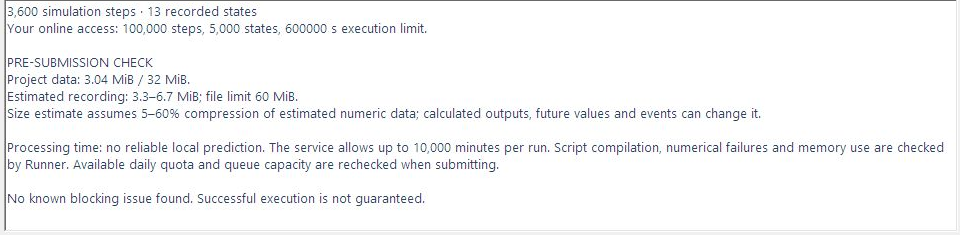
Preflight examines project data and configuration. It can identify known blocking issues and report resource estimates, but it does not execute the dynamic model or compile and run the scripts. A report without a known blocker therefore describes the checks performed, rather than a guarantee of success.
Upload size, estimated recording size and processing limits concern different resources. The recording estimate depends partly on data that will only exist during execution. Simulated duration also differs from elapsed processing time. The online reference documents the report and submission controls.
Exercise: relate the review to the study question
- In the saved scenario, open Run dynamic simulation online and read the timing fields with their units. Compare the schedule’s calculation and recording counts with the behavior the study is intended to observe.
- For the displayed one-hour example, work out the saved instants and consider whether a two-second event would be represented adequately. A different observation goal may require a different recording interval.
- Read the pre-submission report and the source-inclusion choice. Resolve blocking issues and understand any warnings. Current service limits must be available before submission.
- For an inspection exercise, Cancel closes the review without submission. For an actual run, Confirm and send submits it. Guest access, where available, uses a shared allowance; signed-in execution uses the account’s current allowance.
Execution and delivery are two stages
Online Runs distinguishes processing from transfer. A calculation can have completed while its recording has not yet arrived locally. Retry transfer addresses delivery; it should not be confused with submitting a new simulation.
A ready result is a .dpsplay recording. Save it locally, run the portable Player executable and use Open local to select that file. Player does not need Developer or a separate installation. A local archive is needed for later review because the server copy is temporary delivery. The first Player lesson begins by identifying the recording and checking its duration and data, before interpreting any curve.