
Player · Tutorial
Keeping a review with the recording
The numerical result and its presentation have different roles. Saving a review preserves the interpretation aids without recalculating the process.
What belongs to the presentation?
A recording contains saved process values. A review adds choices about how those values are presented: route layout, selected analysis interval and configured charts. These choices can make a particular comparison easier to revisit, but they do not change the original numerical calculation.
This distinction explains why an exported chart image is not equivalent to a saved recording. An image carries one visual explanation. The complete recording can retain the route, other variables, metadata and the chart library needed to continue the review.
A library entry is a retained chart definition
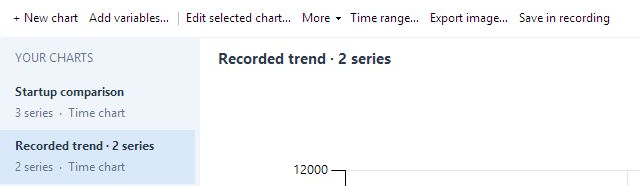
A chart can begin with the view already on screen or with a deliberate selection of recorded variables. Right-click the displayed chart and choose Add to library to retain that view. Alternatively, open Chart library, choose New chart and Add variables, then select the quantities needed for the comparison. In Chart studio, More → Capture displayed chart provides another route from the current view to a library entry.
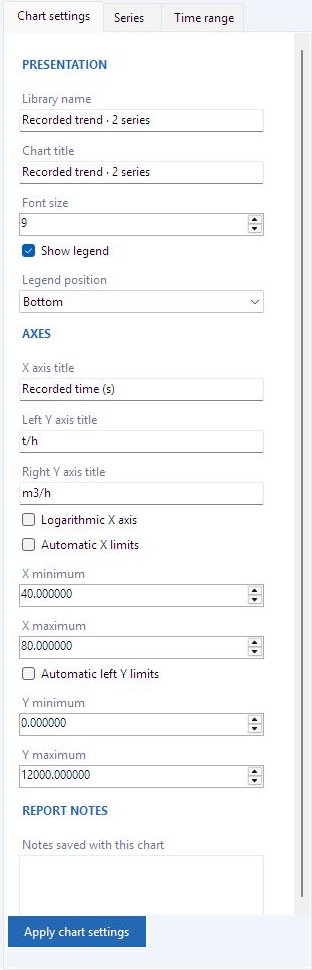
Axis labels, limits, legend settings and notes preserve the reasoning behind a review. For example, a note can explain why the interval is 40–80 s and which scenario produced it. The chart reference documents these fields and their save behavior.
Exercise: test what remains after reopening
There are three checkpoints: apply the intended chart settings, save them into a recording, then reopen that recording. A chart that looks correct on screen has passed only the first checkpoint. The library name identifies the saved entry; the chart title belongs to its plotted figure.
- Use Save local as to create a working
.dpsplaycopy before editing the received recording. In that copy, add the two-series feeder chart to the library, give it a descriptive name and keep the units in its axes and legend. - In Chart studio, select the intended library entry. Use Apply chart settings or Apply series style to inspect the changes in the preview. For a new data interval, use Time range → Update all series. Then choose Save in recording, or Save local in Player, and wait for the successful save message.
- Reopen that saved path and open Chart library. Check the number and identity of the series, colors, axis assignments, chart title and saved interval. Compare one known sample with the value before saving. Distinguish the chart's retained interval from the playhead's current instant.
- Distinguish that retained interval from the playhead’s current instant. In the checked example both library entries and the 40–80 s interval remained, while the playhead reopened at zero.
Included source is another part of the file’s contents
Developer decides whether script source is included when generating the recording. If present, the Scripts viewer permits reading and copying it, but does not execute it. Disabled scripts can also be included. If source was omitted, Player cannot reconstruct it.
This decision is different from protecting unsaved presentation changes. The save/discard/cancel prompt concerns work in the current view. It is not encryption or recipient access control. The manual documents source visibility and unsaved-work behavior separately.
What is being passed to another reviewer?
Sending a reviewed .dpsplay copy passes the recording's data and any included source, together with its saved presentation. The recipient needs the portable Player executable and the recording, but does not need Developer or the editable project. The study identity, relevant interval and reason for the comparison help the recipient understand what is being reviewed.
The current desktop workflow retains results locally. Open online retrieves an available result; server storage is temporary delivery, not a permanent archive. A local copy therefore remains the basis for later review and distribution.